
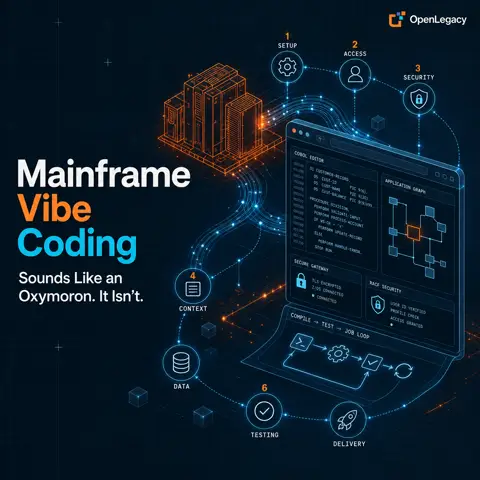
Mainframe Vibe Coding: Sounds Like an Oxymoron. It Isn't.
Seven problems that block AI coding agents on the mainframe, from RACF-secured access and application graphs to test data, specs, and governed agent modes.
Mainframe vibe coding.
Sounds like an oxymoron.
Apparently, it isn't. We've been working hard on it, and it turns out the hard part was never the AI. It was everything around it.
Here are the seven problems we had to solve before an AI agent could do real, useful work on COBOL that lives on z/OS, and what it takes to ship that work safely.
Problem #1: Setup is the first wall
The alternative to coding in a 3270 terminal is VS Code or Eclipse with mainframe extensions. Now try setting that up for a team. Every developer configures host endpoints, ports, certificates, and security settings on their own machine.
Then comes the real issue: mainframe files live on the mainframe. Either you work through a remote file viewer that AI tools can barely see, or you download all the sources to the workstation and hope they stay in sync. Then you set up the AI assistant, its model, its keys, and its tools, per developer.
Slow, fragile, and not trivial. Now multiply it by fifty developers.
What we did: a browser workspace with central administration. One admin view sets the host, the connection method, compile templates, CICS settings, the AI agent's provider, model and keys, and the connected platform services. Every developer session uses that same setup. Until the host is configured, the workspace sends people to administration first, and it only offers connection options that work where it's installed.
Developers sign in with their own host credentials, and every action (browse, read, edit, compile, submit, debug) runs in their own host context. RACF decides what they can touch, exactly as it does today. No local install, no copied credentials, no sources dumped on laptops. Source stays on the host, and the workspace still plugs into the team's Git and CI/CD (more on that below).
Problem #2: Code without context is a guess
An AI that sees one COBOL member is guessing. Real changes need the graph: which programs call this one, which copybooks it shares, which transactions and screens reach it, which DB2 tables and VSAM files it touches.
The graph alone isn't enough either. A change needs to be understood in terms of the business operation the program takes part in ("open account", "post payment"), not just line numbers.
What we did: the application graph sits beside the editor. The open member shows its documentation, its relationships, and the operations it belongs to, with the call chain. Click a call site and the editor jumps to that line. Need analysis for code nobody has looked at yet? Select the datasets in the explorer and start it from there. Only names are sent; the source stays on the host.
The agent works from the same context, so it reasons over the estate, not a single file. It can also ask the graph which programs use a given VSAM file or IMS segment, so a change to a record starts from the real list of readers and writers, not a grep.
Problem #3: Reaching the mainframe at all
Agents need to search, read members, submit jobs, and read job output. Opening that kind of access is usually a security discussion that takes months.
What we did: meet the mainframe where it already is. Connect through the RSE API, or through JZOS when the workspace itself runs on z/OS. Deploy it standalone on premises, inside the platform, or as a lite bundle right beside the host. Where an HTTP surface on z/OS is preferred, a lightweight gateway handles catalog search, dataset reads, and jobs, with every call running as the caller's RACF user and write operations closed by default.
Either way, no shared service account and no new trust model.
Problem #4: Testing, and debugging when the test fails
Editing COBOL is the easy part. Proving the change didn't break anything is where mainframe projects stall.
What we did: testing is part of the loop, not a separate project.
Compile from the editor and follow the job. Hand a compile failure to the agent and it edits and recompiles until the listing is clean. After a successful compile, refresh the CICS program so the next test runs the new code.
Then run it. Prepare a test asset for the program you just changed, send the input, and read what came back. Every run keeps its input, output, status, and timing, so you can compare before and after. CICS logs for the test jobs are one click away. Wrap the program as a callable asset and run JSON test cases against it the way an API consumer would.
The agent can do all of this too. It asks for approval before a test run, unless you've given it full access.
And when the test returns the wrong answer, debug it where you are. The workspace sets your CICS debug profile, catches the matching transaction, and attaches to the task. Set breakpoints, step through the code, read and change variables, add watches, evaluate expressions, then continue or disconnect, all in the browser. It needs z/OS Debugger configured for the region; there's nothing to install on the desktop.
Problem #5: Test data belongs in the code's context
To test a program you need to know what data it reads. Developers usually go hunting for it in a separate tool, with separate credentials.
What we did: the data is one click from the code. Pick an EXEC SQL block in the open member, adjust it, fill the host variables, and run it as a read-only DB2 query, even before you save your edits. Pick a CICS READ or browse statement, and the workspace resolves the logical file to its VSAM dataset and pages through the decoded records.
After a test, the agent can read back the records the transaction touched, and the OL Journal entries it wrote, to check that what changed is what was supposed to change.
Read-only by design: only SELECT and WITH go to DB2, and only read commands run against VSAM. Same sign-in, same security.
Problem #6: Complex processes nobody documented
Large mainframe processes span dozens of programs, and the knowledge sits with people who are retiring. "Just read the code" doesn't scale, and neither does asking an AI to summarize forty thousand lines in one prompt.
What we did: generate a specification from the open program. The workspace takes the business operations the graph already found for that member, runs the analysis, and shows the specification and its diagrams beside the source, while it's still being written. The result is a governed artifact, not a chat transcript.
The spec becomes shared context: for the developer reviewing a change, for the agent planning it, and for whoever comes next. For quicker answers, the agent can also explain a program or write a README from a screen program on demand.
Problem #7: Actual vibe coding
With all of the above in place, the last step is the one everyone expects: describe the change and let the agent do it.
What we did: an agent harness built for mainframe work. Every turn runs in a mode that decides what the agent may do:
- Ask reads and searches, and never changes code.
- Plan proposes a larger change; you approve it before anything is edited.
- Agent makes the change in the workspace.
- Clean compile edits and recompiles until the build is clean.
The harness loads mainframe skills for each mode: COBOL column conventions, BMS maps, clean compile, RPC extraction. Built-in workflows cover the common jobs: explain this program, fix a failed compilation, rename a field across a transaction, extract an RPC program. Bigger tasks run as a lead that delegates to an analyst and a writer. Conversations, plans, and usage are kept, so you can pick up where you left off.
And the developer stays in charge. There is no tool that writes straight to the host. The agent edits the workspace copy, you review the diff, and only accepting it saves the member to the host.
Prefer your own agent? The same host tools are available over MCP: search, read, compile, jobs, CICS logs and program refresh, test assets, data usage from the application graph, record and journal reads, and the OL Journal workflow. They run in the signed-in user's host context, each turn gets only the tools its mode allows, and steps that change the host follow the same approval rules as the built-in agent.
Shipping it: Git, CI/CD, and easy rollback
A change isn't done when it compiles. It has to move through the same pipeline as everything else, and it has to be easy to undo. Teams work in one of two modes, and each gets its own safety net.
Working in USS? Git is the bridge to CI/CD. In the USS work mode, the workspace clones the team repository into a Unix workspace, and developers branch, commit, pull, rebase, and push from the sidebar, next to the member they just changed. From there, the pipeline you already run takes over: builds, reviews, approvals, promotion. Saving to the host and committing to Git stay separate, deliberate steps, so nothing reaches the pipeline by accident.
Running Endevor? Keep it as the system of record. With Endevor's Git bridge synchronizing Endevor inventory and a Git repository, commits from the workspace follow the same Endevor-governed promotion path. Mainframe code joins the enterprise CI/CD instead of living beside it.
Working directly in PDS? Rollback is one click. A PDS member has no version control of its own, so the workspace keeps one for you. Every save of a member keeps a copy, labeled by where it came from: the editor, the agent, the OL Journal wizard, a bulk upload, or the host text captured just before the save. A save that changes nothing doesn't add a copy. Open the file history, compare any copy side by side with the editor, and restore it. Restore loads the text into the editor; nothing touches the host until you save. An agent change that looked right but wasn't is easy to take back. Administrators decide how many versions to keep per member.
One more thing
Vibe coding isn't only for fixes. The same loop modernizes and hardens:
- Expose the business rules. Convert screen-bound COBOL into an RPC program that keeps the rules and exposes them as a service.
- Call out. Generate a client so COBOL can call a modern REST API.
- Add an audit trail. The OL Journal wizard scans CICS and batch COBOL for VSAM writes, rewrites, and deletes (and IMS inserts, replaces, and deletes), generates the journal calls, and shows each one as a diff. Nothing is saved until every change is reviewed, and the save is refused if someone changed the member on the host after the review. Then compile, refresh the program in CICS, or generate the definition job for programs CICS doesn't know yet.
Bottom line
Vibe coding on the mainframe isn't about a smarter model. It's about giving the model what a senior mainframe developer already has: secure access, the application graph, the data, the tests, a debugger, and the documented intent. Then giving the team what it needs to trust the result: a pipeline it already knows, an audit trail, and an easy way back.
A browser IDE alone doesn't get you there. A coding agent alone doesn't get you there.
OL Code, with the supporting OpenLegacy platform, does.