
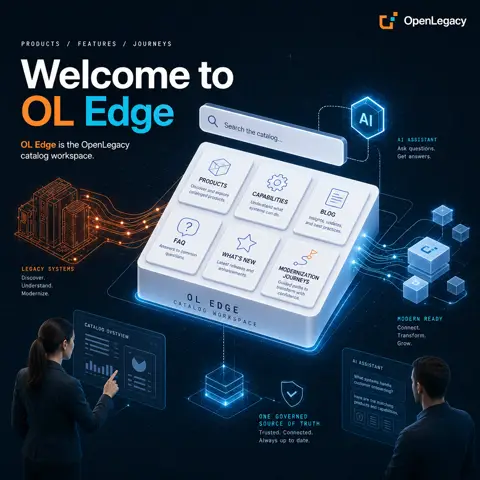
Welcome to OL Edge
One place to find every OpenLegacy product, capability, and modernization scenario, for the humans who read it and the agents who query it. Here's your guided tour.
One place to find every OpenLegacy product, capability, and modernization scenario, for the humans who read it and the agents who query it.
If you have ever hunted through slide decks, wiki fragments, and outdated one-pagers to figure out what an OpenLegacy product does or how two products fit together, OL Hub Catalog is built for you. It is OpenLegacy's living product and capability catalog: portfolio knowledge (products, features, relationships, landscape comparisons, domain journeys, blogs, and media) turned into pages people can browse and agents can query. This post is your guided tour.
What is OL Hub Catalog?
Think of it as the single source of truth for the OpenLegacy platform. Instead of scattered documentation, everything about the suite lives in one governed, searchable place that stays in sync. It documents and connects the whole OpenLegacy product suite so customers, partners, and agents share one view of what each product does and how they work together.
It sits alongside OL Hub (the control plane that provides shared identity, tenancy, licensing, API keys, access control, and MCP endpoints across the OpenLegacy suite) and puts the portfolio story in front of the people and agents who need it.
Where to find all product information
The heart of the catalog is the Product & Feature model. Products carry the portfolio narrative (overview, logos, screenshots, videos, documentation links, version status, and tags), while features describe individual capabilities that can belong to one or more products.
Today the catalog covers the full OpenLegacy portfolio, including:
-
OL CoreIQ: discover, test, document, and API-enable mainframe and IBM i assets close to the source system.
-
OL Integration: expose mainframe and IBM i business logic as modern APIs, events, and services without rewriting core systems.
-
OL AtomIQ: legacy language intelligence that analyzes COBOL, RPG, PL/I, Natural, JCL, and Easytrieve to discover business entities and dependencies.
-
OL DataIQ: query, migrate, and operationalize data across legacy and modern databases.
-
OL Code: a web IDE to develop, refactor, compile, and modernize COBOL and RPG.
-
OL Next: convert legacy screen and RPC programs into runnable, validatable modern code.
-
OL Spec: generate specifications, documentation, and modernization blueprints with AI.
-
OL TermIQ: discover business processes and screen flows from terminal recordings.
-
OL Terminal: browser-based 3270 and 5250 access without desktop emulators.
-
OL Planner: visualize, design, and govern modernization roadmaps.
-
OL AppIQ: build enterprise applications and workflows on OpenLegacy-discovered assets.
-
OL Z Gateway: secure HTTP APIs on IBM Z for datasets, catalog search, VSAM records, and change data capture.
-
OL Hub and OL Edge: the platform control plane and the catalog itself.
Browse Products and Features from the sidebar, drill into any product's story and its linked capabilities, and filter by tags, personas, and maturity to find exactly what matters for your audience. A header search spans products, features, and blog posts, so you rarely need to know an exact page path or slug to get where you are going.
Where to find modernization scenarios
Products tell you what each tool does. Modernization is rarely a single tool, though. It is a path across several. The catalog captures that story in a few complementary ways.
Domain Journeys are marketing-ready, timeline-style diagrams that walk through a multi-step story: a modernization path, a domain flow, or how several OpenLegacy products combine for a use case. Each journey has ordered steps with descriptions, optional media, and optional linked blog posts, so buyers and architects grasp a complex, multi-product journey in minutes rather than piecing it together from a flat product list.
The Landscape Comparison Matrix answers "how do these products differ?" in a single view. It compares a curated subset of products side by side with groups, columns, and cell badges, plus per-product notes on AI, MCP, and deployment, with no need to open a dozen product pages.
The Product Relations Graph maps how products work together as directed product-to-product edges, each with a use case, description, and optional media. It shows the suite as a connected platform rather than a set of isolated tools, and every product page surfaces its incoming and outgoing relationships in context.
Together these turn "which products should I use, in what order, to modernize this system?" into something you can see and follow.
Built for AI and agents, too
OL Hub Catalog is designed to be read by machines as well as people. It ships dual MCP endpoints: a public, read-only /mcp-public for anonymous agents to safely discover the portfolio, and an authenticated /mcp for editors and trusted agents to perform writes, hybrid search, ask_catalog, and audit under role-based access.
For interactive discovery, the Ask AI assistant (open it from the header or with Ctrl/Cmd+K) answers natural-language questions about products, features, and how they relate, and can cite live catalog sources, ideal for comparison and discovery questions when you do not know every slug.
One catalog, many languages
Modernization is a global effort, and OL Hub Catalog is built to serve a worldwide audience from a single source. Its multi-language localization switches locale among English, Spanish, Japanese, and Hebrew, and choosing Hebrew flips the entire UI to right-to-left. Changing language reloads the app so catalog content is re-fetched for the new locale. Localization works on two distinct layers:
-
Static UI strings: buttons, labels, navigation, and dialogs come from shipped
i18ntranslation files. These are curated and require no AI, so the interface chrome is consistent and reliable in every supported language. -
AI-translated catalog content: the portfolio itself (product names, descriptions, markdown overviews, feature text, and similar fields) is stored in a source language. When you view another locale, the app requests translated content and the server may return AI-translated text, cached when available. If AI translation is turned off, the original source-language content still displays, so the catalog is never blank.
The same reach extends to agents. Because MCP has no browser Accept-Language header, agents pass an explicit optional locale (en, es, ja, he) on read, export, and help tools to get catalog data in the language they need. The net effect: UI chrome and portfolio content both follow the reader's language, including full RTL for Hebrew, so one catalog can be shared across regions without maintaining separate copies.
Take it with you
Found what you need and want to share it? PDF & PPTX export lets you assemble a selection of products, features, and blog posts (blogs in PDF) and download a shareable reading pack or a presentation deck, turning live catalog content into handouts and slides without copy-paste.
For editors: keep the story current
Signed-in editors unlock admin mode across products, features, blogs, relations, landscape, and a shared media library. A draft/publish and approval workflow, public/internal visibility, comments with "Apply with AI," and full audit of every change keep the public portfolio accurate and governed. Contributors draft safely, editors approve, and every change is traceable.
Start exploring
Whether you are a customer sizing up the platform, an architect planning a modernization path, a solution engineer building a proposal, or an agent querying the portfolio programmatically, OL Hub Catalog is your starting point:
-
Products & Features: what every OpenLegacy product and capability does.
-
Journeys, Landscape, and Relations: how they combine into modernization scenarios.
-
Ask AI and MCP: discovery for humans and agents alike.
-
Languages: browse the whole catalog in English, Spanish, Japanese, or Hebrew (RTL).
-
Export: take the portfolio story with you.
Welcome to OL Hub Catalog. One source of truth for the OpenLegacy suite, and for every modernization story you want to tell.