
OL Integration
OL Integration
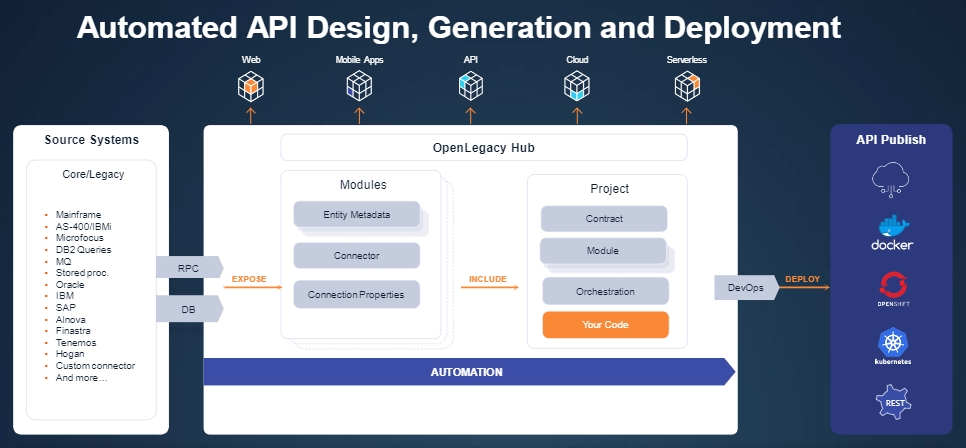
OL Integration on OpenLegacy Hub provides a simple, fast way to expose legacy data as microservice-based APIs using low-code / no-code flows.
Before you begin
- Install OL CLI: Mac · Windows · Unix
- Sign up to OL Hub
- Generate API keys
- Log in to OL CLI
- View the OL Hub dashboard
Then start creating microservice-based APIs.
Platform setup (SSO, licenses, Hub Enterprise) lives in OL Hub help.
- Getting Started
- Creating Microservice-based APIs with OL Hub
- Public APIs — backend
- connections
- create new connection
- get connection by id
- get connection by name
- get all connections
- update existing connection by id
- delete connection by id
- modules
- push module
- read module
- read all modules
- update module
- delete module
- delete module by name
- add asset to module
- Create Module By Solution
- projects
- Create Project
- get project
- get all projects
- update project
- delete project
- delete project by name
- Create Project By Solution
- Tag Project By Id
- Deploy Project
- contracts
- Create Contract
- Get Contract
- Recipes
- Create & Push Module
- Reference Cli Reference
- OpenLegacy Compatibility Matrix
- CLI Command Reference
- Global Options
- CLI Command Syntax
- ol add
- ol clone module
- ol config deployer
- ol config fetcher
- ol config hub
- ol config module
- ol config proxy
- ol copy asset
- ol create agent
- ol create api-key
- ol create client
- ol create contract
- ol create fetcher
- ol create method
- ol create module
- ol create project
- ol create remote-client
- ol create template
- ol create test
- ol delete agent
- ol delete asset
- ol delete contract
- ol delete hub
- ol delete module
- ol delete profile
- ol delete project
- ol delete property
- ol delete test
- ol deploy
- ol export project
- ol export repository
- ol fetch
- ol generate
- ol import module
- ol import repository
- ol list agents
- ol list api-keys
- ol list assets
- ol list connectors
- ol list deployers
- ol list generators
- ol list hubs
- ol list modules
- ol list profiles
- ol list projects
- ol list templates
- ol list tests
- ol login
- ol logout
- ol push asset
- ol push module
- ol push resources
- ol set cache
- ol set property
- ol start agent
- ol start emulation
- ol templates edit
- ol test asset
- ol test connection
- ol test method
- ol update api-key
- ol update settings
- ol usage
- public apis - backend (moved)
- Reference Connector Cheat Sheets
- Connector Cheat Sheet Reference
- CICS-COBOL
- IBM-MQ-COBOL
- IBM-MQ-PCML
- IBMi-AS400-COBOL
- IBMi-AS400-PCML
- IMS-COBOL
- IMS-PL/1
- MF-CTG-COBOL
- ORACLE-STORED-PROCEDURE
- SAP
- TEMENOS-TAFC
- DB2-ZOA-SP
- REST-API
- ORACLE-DB
- xml-files
- MSSQL
- Sybase-DB
- MF-DATASET
- Reference Public Apis Modules
- Module
- read module
- delete module
- update module
- create module
- read all modules
- delete module by name
- Reference Public Apis Projects
- Project
- get project
- update project
- delete project
- create project by modules
- get all projects
- create project by solution
- add modules to project
- tag project by id
- tag project by name
- deploy project
- duplicate project
- Installation
- OpenLegacy CLI
- Install OpenLegacy CLI (Windows)
- Install OpenLegacy CLI (Mac)
- Install OpenLegacy CLI (UNIX)
- Log in to OpenLegacy CLI
- Creating Modules And Assets
- Creating Modules and Assets
- Connection Profiles
- Handling Redefine Statements
- Asset Variants
- Dynamic Redefine fields
- Reusing Connections
- Pre Processors
- Resources
- Legops
- Domains & Models
- Global Models
- Creating Projects
- Create a Project
- Create an OpenAPI contract
- Creating The Method Flow
- Adding fields to the method flow
- Mapping fields between steps
- Using JWT fields in the method
- Authenticating JWT Against the OPA Service
- Add an expression step to the method flow
- Add a condition step to the method flow
- Invoke on Condition (Invoke Step)
- Handling Errors in the flow
- Add a Parallel step to the method flow
- Customizing method fields using expressions
- Create and use Flow Functions
- Screens flow
- Screen Project - Connection Pool
- Screen Sub Flow
- Customizing method flow using entrypoints
- Testing the Method Flow
- Working With Projects
- Tag a Project
- Labels and Filters
- Exporting Projects
- Deploying Projects Automatically
- Project Configuration Variables
- Reverse API
- IBMi(AS/400) Reverse API Cobol Client Deployment
- z/OS CICS Reverse API Cobol Client Deployment
- Legacy Screen Applications
- Deploy to the OL Hub Runtime
- OL-Hub Runtime Dashboard
- Executing a Project Test Plan
- Creating a Custom Deployer in OpenLegacy Hub
- OpenShift Deployer Parameters for OpenLegacy Hub
- EKS Deployer Parameters for OpenLegacy Hub
- GKE Deployer Parameters for OpenLegacy Hub
- Maintenance
- Exporting and Importing Repositories
- Advanced Configuration
- Including Error Messages in OpenLegacy API REST Responses
- Red Hat Marketplace - Getting Started
- Deploy to No-Code Container
- CICS Adapter Rollback
- Create a DB Poller Service
- Customizing service generator templates
- Configure the XML Connector Parser
- Configuring Webhooks
- Using Remote and Local Agents
- Using Asset Caching
- H3270 SSL Connection Configuration
- Kafka Producer - Serialization of Additional Message Properties
- Parallelism in Kafka Consumer Projects
- OpenLegacy REST Connector – Proxy Configuration Guide
- Flow Logging
- Using Original Name when creating as asset
- Recording Mainframe Screen Sessions with the Loki Recorder
- Using Project Configurations and Flow Variables in an Expression Step
- Monitoring Screen Flow Steps Duration
- Connector Guides
- IBM Mainframe
- IMS-COBOL Connector
- IMS-PL/1 Connector
- MF-CICS-COBOL Connector
- MF-CTG-COBOL Connector
- MF Natural Connector Guide
- Mainframe Dataset Connector Guide
- IBMi (AS400)
- IBMi-AS400-COBOL Connector
- IBMi-AS400-PCML Connector
- Message Queues
- ActiveMQ Connector Guide
- IBM-MQ-COBOL Connector
- IBM-MQ-PCML Connector
- Kafka JSON Connector Guide
- SAP Connector
- REST
- REST JSON Connector Guide
- REST-XML Connector Guide
- REST-XSD Connector Guide
- REST-OPENAPI connector
- SOAP-WSDL Connector Guide
- Databases
- DB2 AS400 Connector Guide
- DB2-ZOS-DB connector
- SQLSERVER-DB Connector
- ORACLE-DB Connector
- SYBASE-DB Connector
- IMS-DB Connector
- Files
- Files SFTP Connector Guide
- XML-FILES-XSD Connector Guide
- Temenos
- Temenos T24 TAFC Connector Guide
- Temenos T24 TAFJ Connector Guide
- Micro Focus Connector Guide
- VSAM-CICS Connector Guide
- ISO8583 Connector Guide
- CORBA Connector Guide
- Generator Guides
- Spring Java Rest Generator
- Spring Java Controllers Generator
- Spring Java SOAP Generator
- Spring Java Kafka Generator
- Spring Java IBM MQ Generator
- Spring Java ActiveMQ Generator
- Spring Java File Consumer
- Spring Java DB Poller Generator
- AWS Java Lambda Generator
- Glossary
- Asset
- Business Fields
- Business Operation
- Connector
- Contract and Method
- Data Consumer
- Data Source
- Module
- Project
- Service
- Solution
- Faq
- How to resolve SSL connection Error when starting the OpenLegacy API
- How to generate OpenLegacy Lowcode API with Maven
- How to start OpenLegacy Lowcode API with Gradle
- How to resolve an OpenLegacy API that fails to start
- How to Configure the Log Level
- How to Dockerize the OpenLegacy API
- How to work with OPZ
- How to Log Binary Information
- How to configure and run Mainframe H3270 Screens project
- How to configure and run the IBMi TN5250J Screens project
- How to work with project tags
- How to set OL HUB Logging level
- OpenLegacy LowCode API - Supported Environment Variables
- How to work with OLB
- How to add tracing information to OpenLegacy LowCode API
- OpenLegacy H3270 Connector and the USER Directory
- How to Dismiss Empty Records In a Collection By Key Field
- 🛡️ Using Self-Signed Certificates with Java-Based Applications
- Working With Distributed Tracing with OpenLegacy: Propagating Trace ID and Span ID
- Running the OpenLegacy API with GraalVM JDK
- Using Environment Variables Inside The Connection
- No-Code Integration Setup for OpenLegacy H3270 Screens API
- Matching Buffers to COBOL REDEFINE Structures
- No Methods in OpenAPI Endpoint
- How to Suppress Vert.x Block Logs
- How to increase the request size limit in OpenLegacy API