
Reverse API
Overview
We primarily use APIs to get data from a backend system to an external client. For example: a mobile app to open a bank account would use an API to send data provided by users to a mainframe RPC program that would actually perform the action of opening the account.
But what if a mainframe program requires information that resides outside of the mainframe?
Some use cases:
- Mainframe requires real-time exchange rate information from an external system/provider.
- Some mainframe programs were migrated to a cloud-based environment, while the remaining mainframe programs still need to use the migrated programs.
The Reverse-API is an HTTP/HTTPS server that receives a mainframe Request Buffer that invokes the appropriate Hub Project method (according to the URL called by the mainframe). The project method is then executed and its response is sent back to the mainframe as a buffer.
Our server acts as a proxy for the mainframe, calling the external service in lieu of the mainframe and returning the results, thus allowing mainframe programs to communicate with external REST APIs, other systems, and any backend system for which OpenLegacy has a connector.
The Hub will create that server for you, ensure that all the deployed methods support application/octet-stream, and make sure that the models sent and received by the mainframe align with the Project methods by enabling users to generate Cobol clients. These clients can be compiled on the mainframe with very little editing required. Once compiled, other programs can make calls to these clients and utilize them for their own needs.
You can have a service up and running in a matter of minutes.
The diagram below illustrates this Reverse-API architecture:
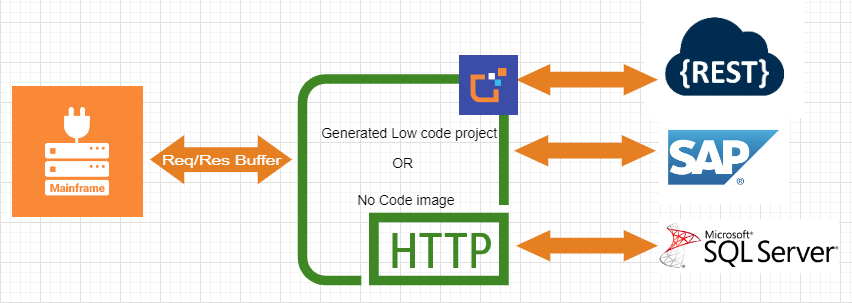
A simple (but common) use case walkthrough:
On the Hub or using the CLI
- Create a REST OpenAPI module.
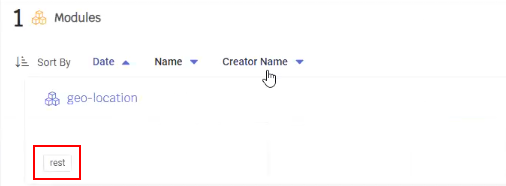
- Add assets by providing the Rest API OpenAPI spec.
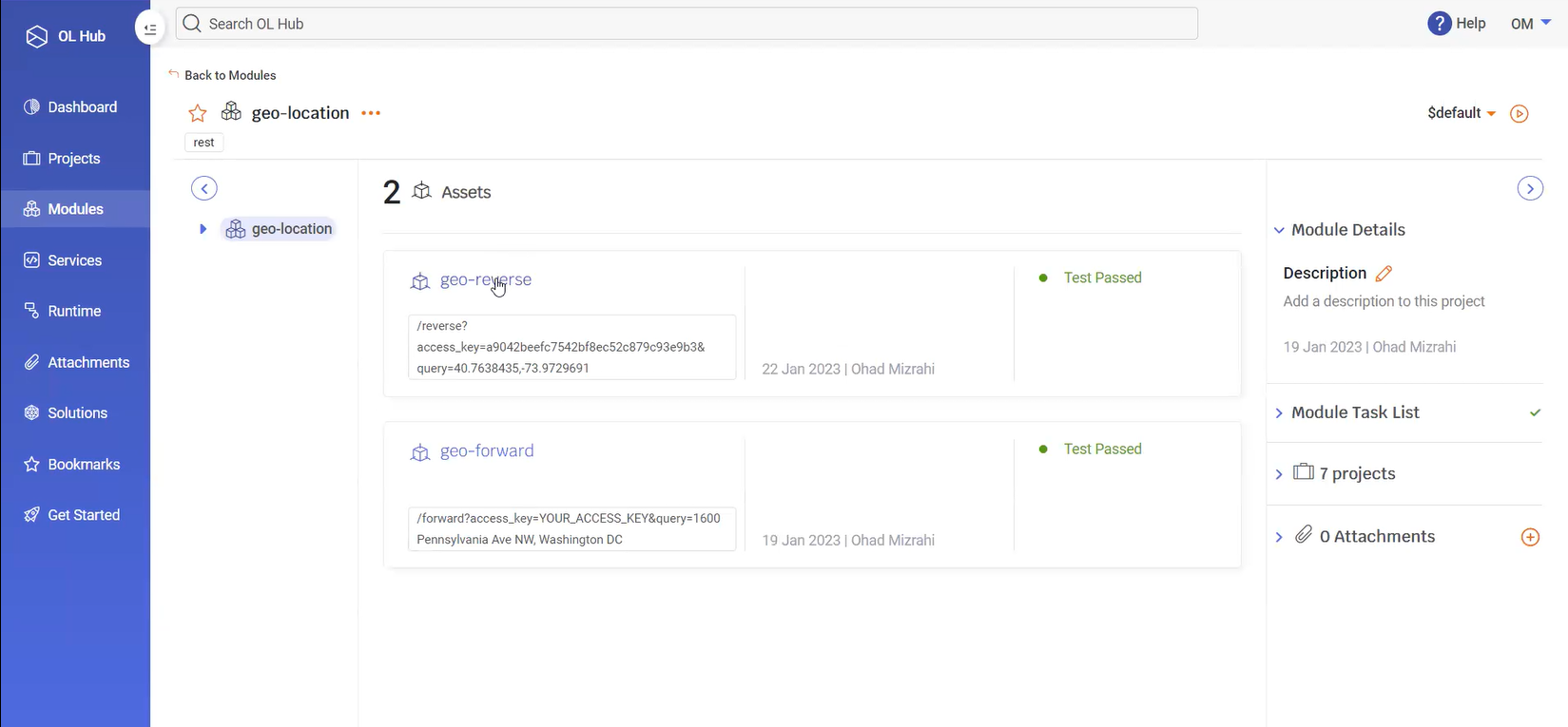
- Test the assets and verify everything is working properly.
- Create a new project and associate the newly created module with it.
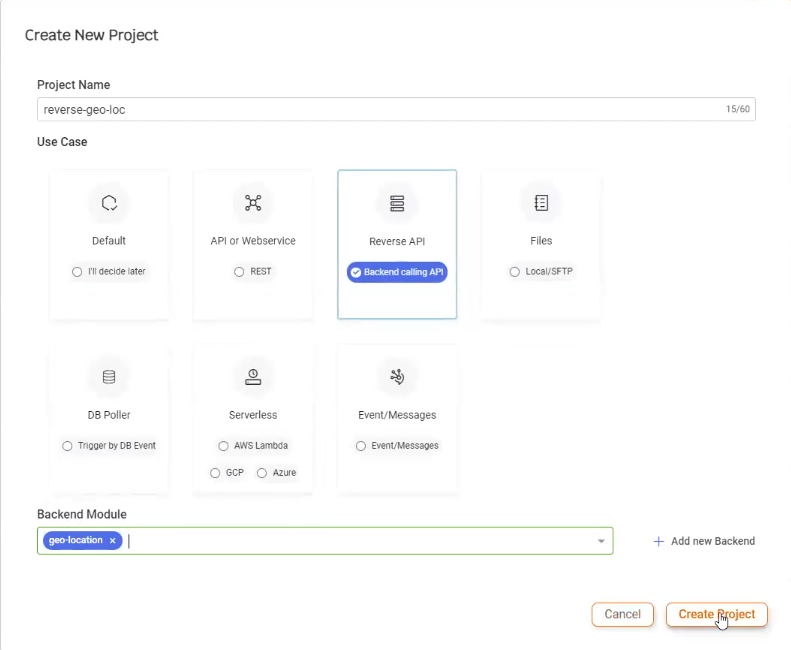
- Change the Use Case to Reverse API.
- Create a project contract by selecting the Auto-Generated option. This option ensures that the contract is generated configured for Reverse API.
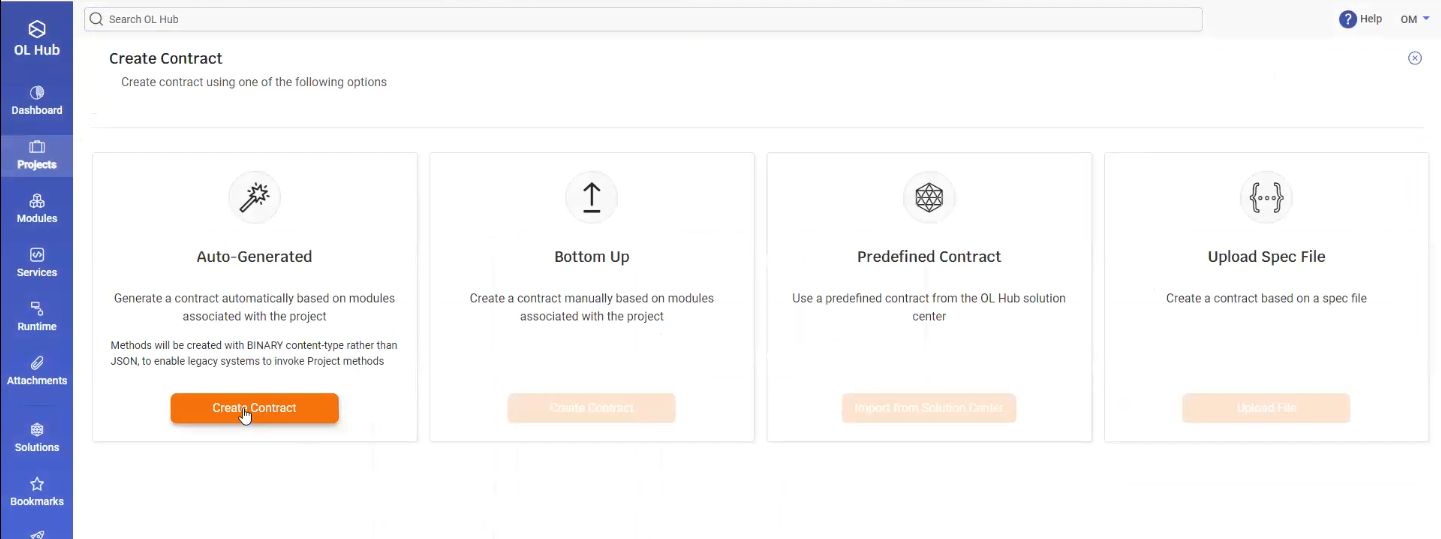
- The methods are generated for each asset.
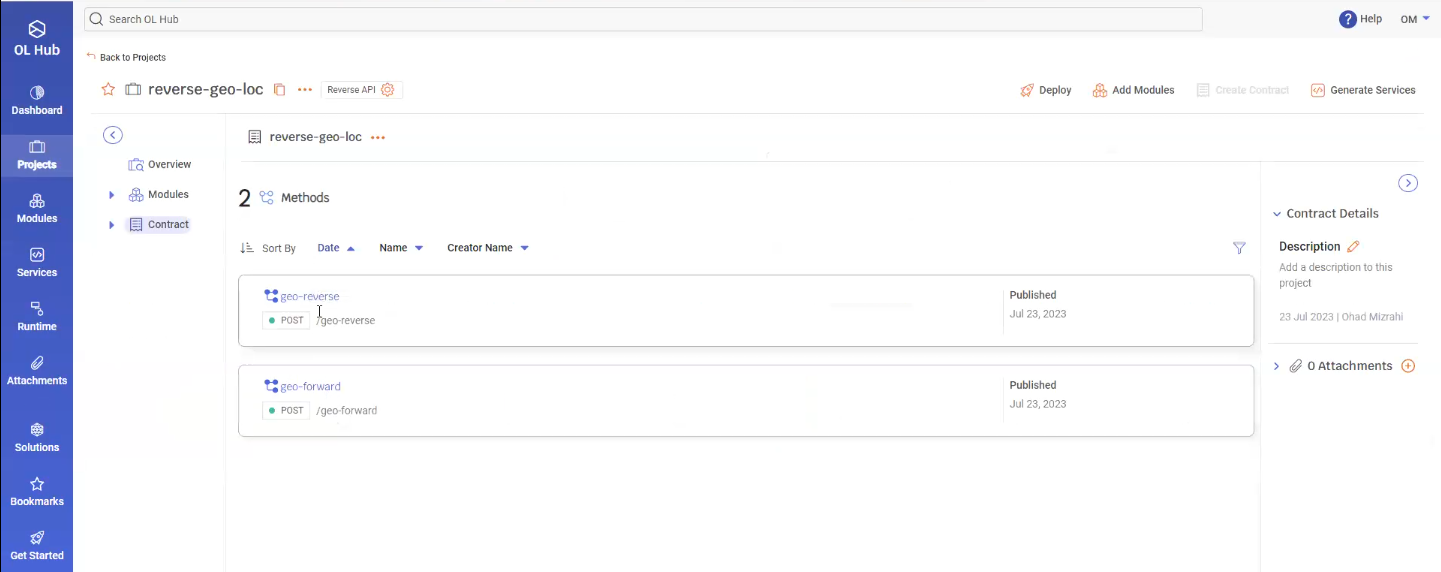
- Deploy the project (Low Code / No Code) by clicking on the
 Deploy button.
- At this point, you can simulate a Mainframe call by opening the Swagger page and providing the method with a Binary file to simulate a mainframe request.
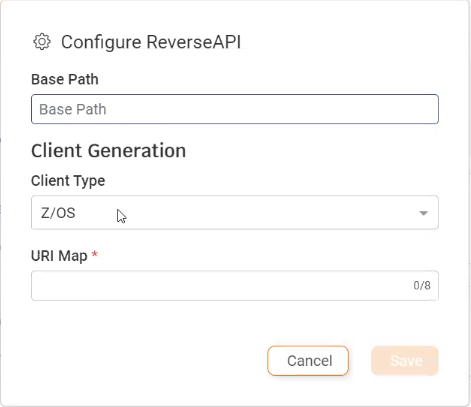
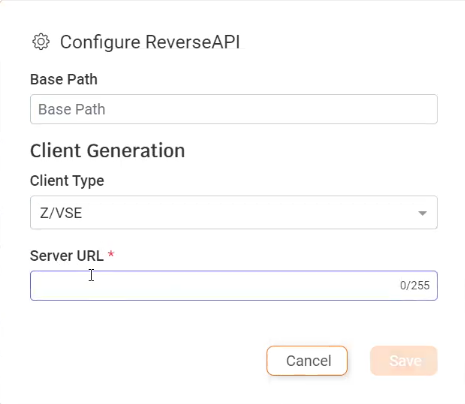
- Click on Configure ReverseAPI to configure the contract.
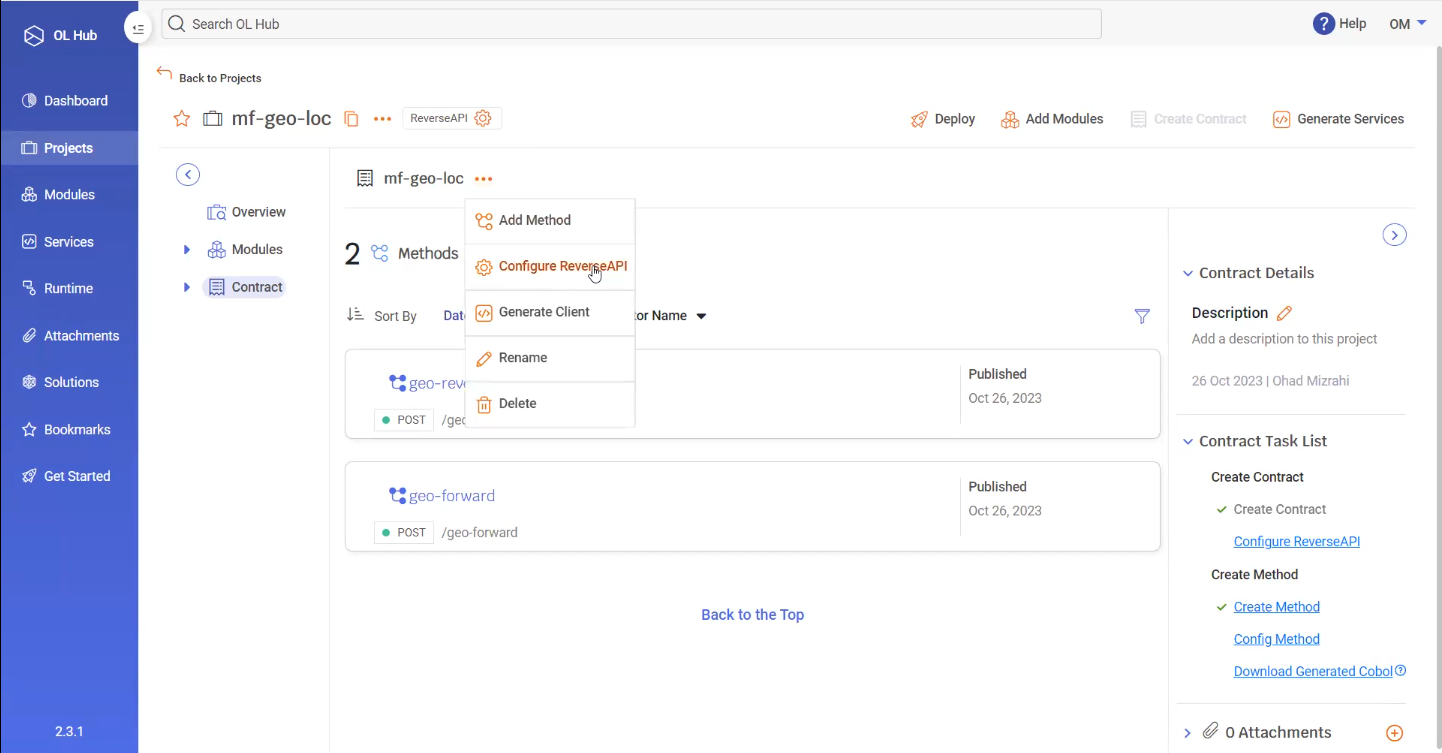
- The Configure ReverseAPI window opens.
- The Base Path specifies the configuration of the deployed service on the machine. For example, if it is deployed on the xxx.xxx.xxx.xxx machine, then to call the service you would reference:
xxx.xxx.xxx.xxx/<Base Path> - The Client Type specifies the client architecture. The current types are mainframe (Z/OS or Z/VSE) and AS\400 (COBOL or RPG).
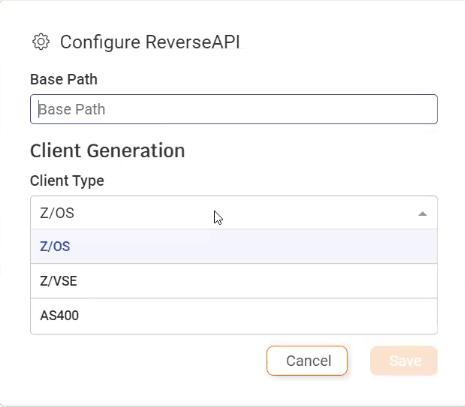
- The Base Path specifies the configuration of the deployed service on the machine. For example, if it is deployed on the xxx.xxx.xxx.xxx machine, then to call the service you would reference:
- If a Z/OS Client Type is selected, you must also specify the URI Map name in the mainframe that holds the URL for OpenLegacy deployed service.
- If a Z/VSE or AS400 Client Type is selected, you must also specify the Server URL for the OpenLegacy deployed service.
- Click Save to save the ReverseAPI contract configuration.
Field Buffer Sizes in Client Generation
Because Legacy systems rely on fixed buffer sizes for input fields — sizes that depend on the field’s data type — OpenLegacy assigns default buffer values designed to cover most common cases.
In some scenarios, an executed asset may contain fields that vary in length.
For example, a balance field might hold values such as 153.26 or 123,456,433.34.
While the asset itself may be agnostic to the exact field size, a COBOL client requires a defined field length at generation time.
To simplify this process and avoid manually setting sizes for every field, OpenLegacy provides the following default buffer sizes:
| Data Type | Default Size | Notes |
|---|---|---|
| String | 50 | Applies to character fields |
| Numeric | 18 | Includes 2 decimal digits for Double types |
| Collection | 20 | Default number of items in a collection |
Users can override these defaults in two ways:
- Per field: by setting a custom length for a specific input or output field.
- Globally: by updating the default values in the method’s Configure Reverse API window.
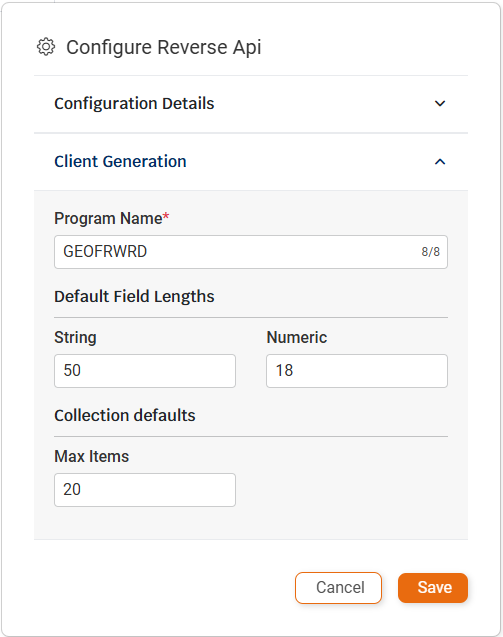
- You may need to edit the client to change the default settings for the fields.
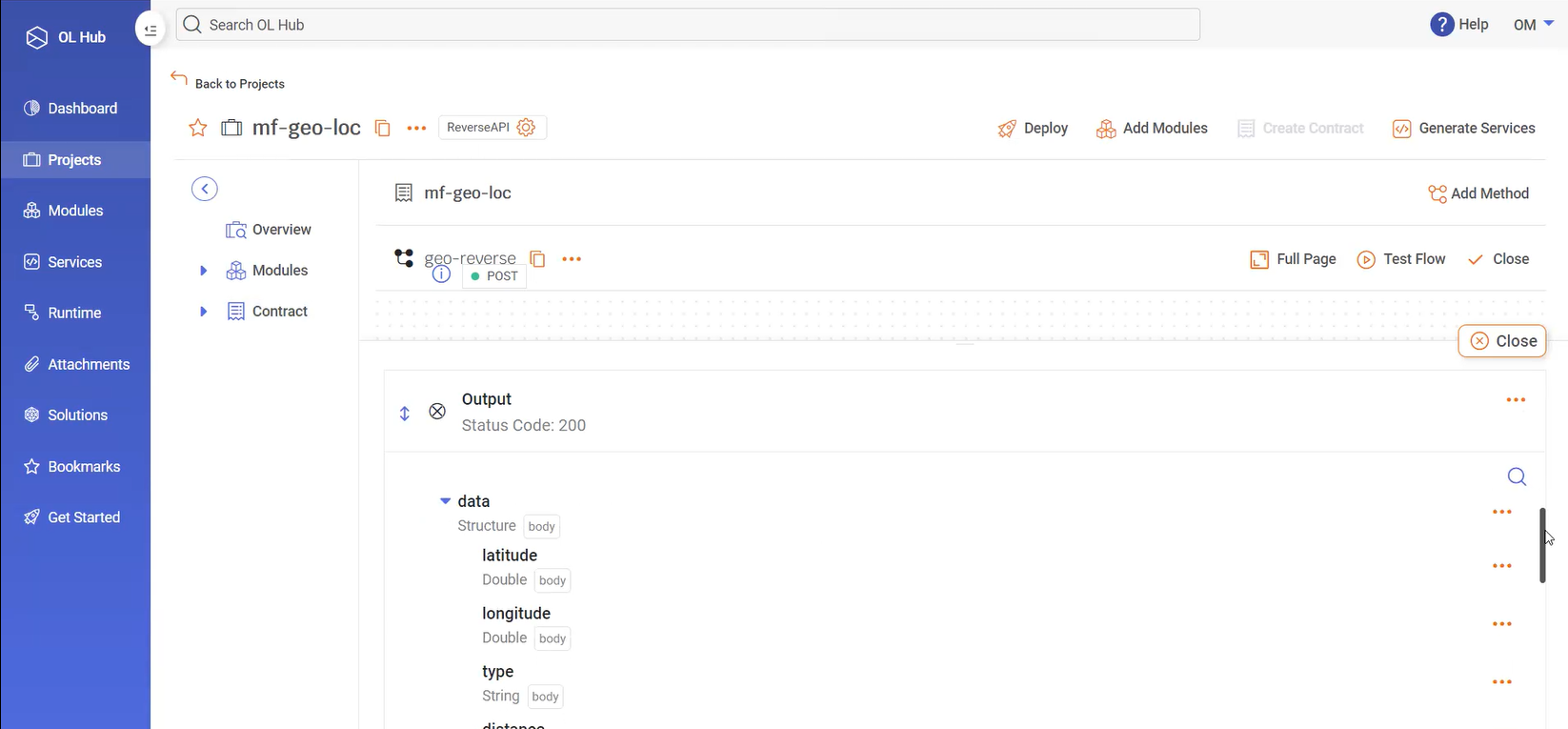
- Click Generate Cobol.
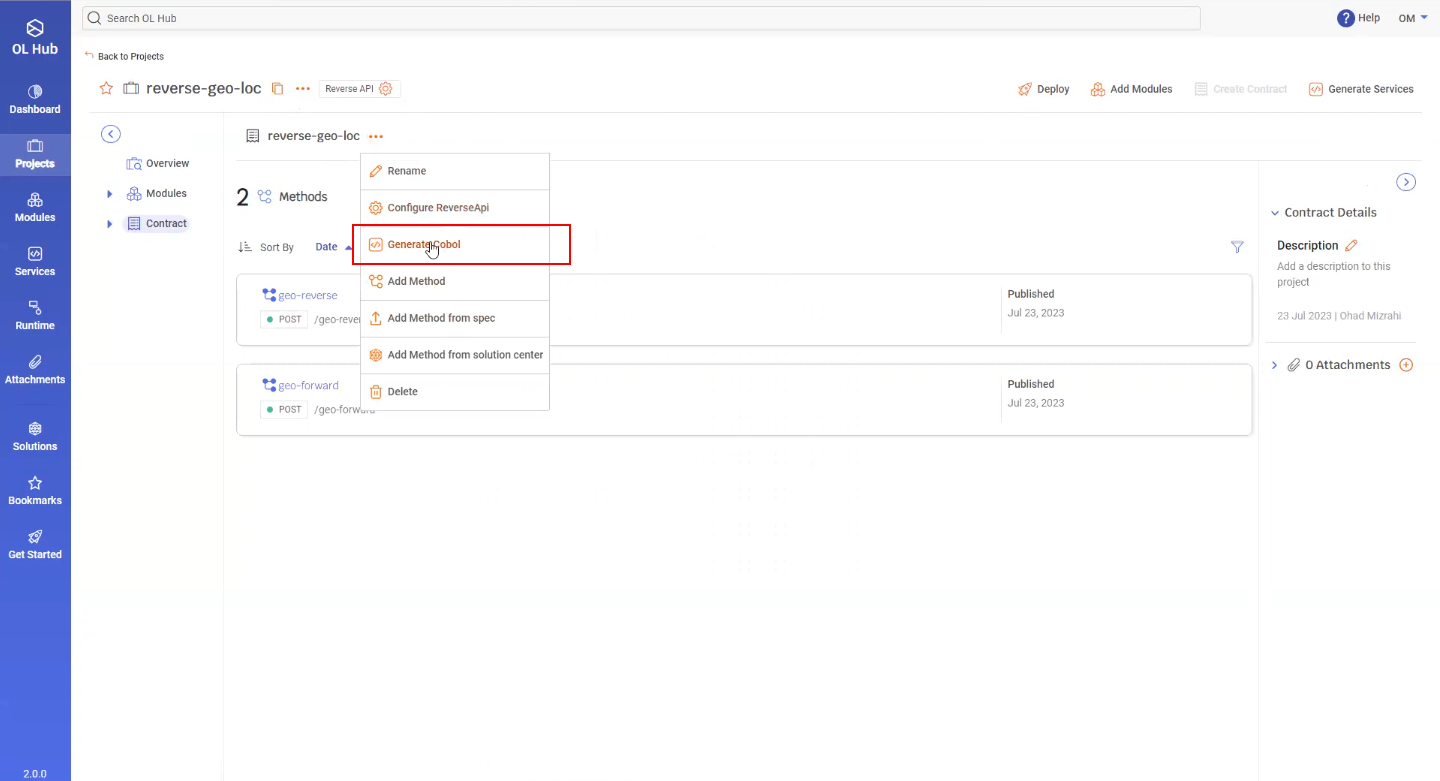
- A zip file of the Cobol client is downloaded.
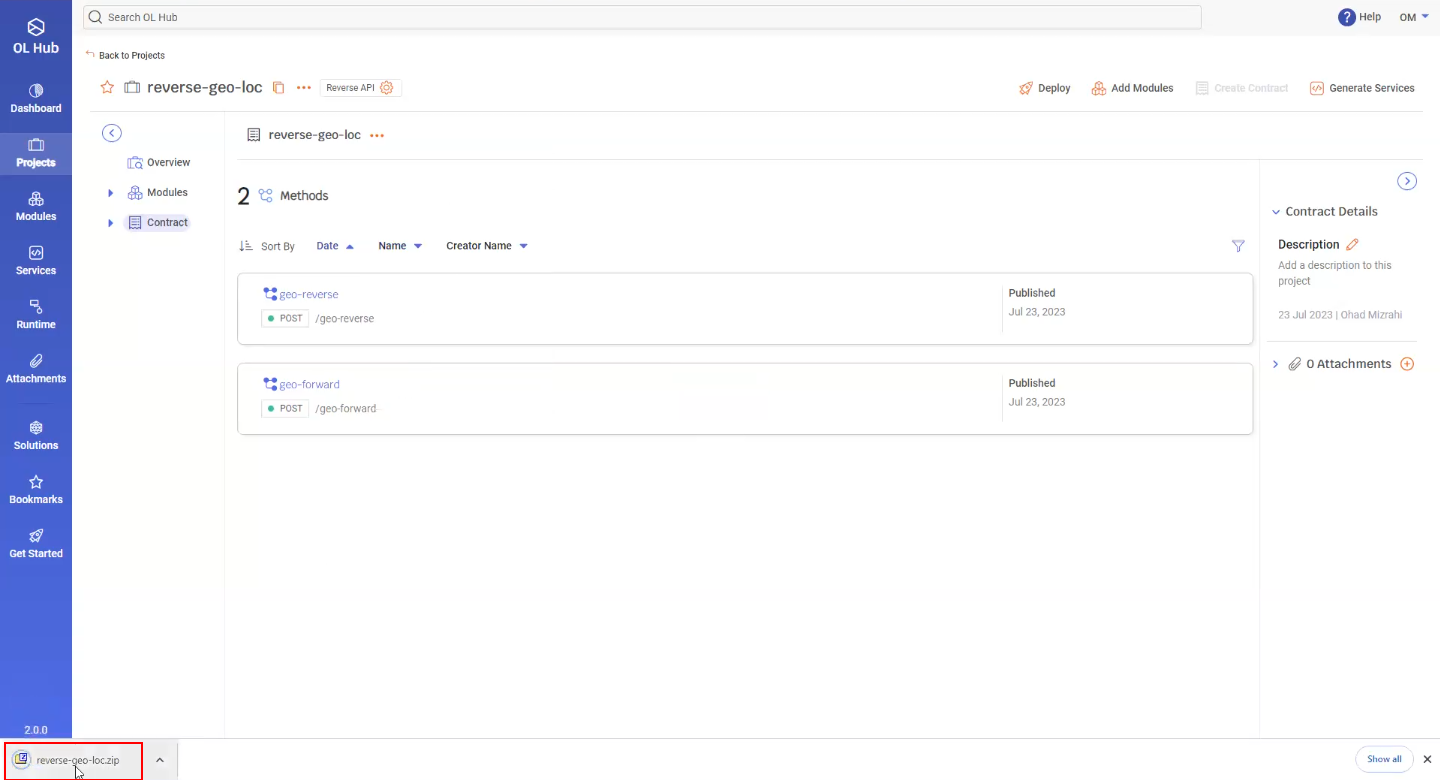
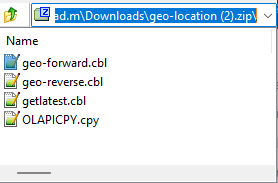
- The zip file consists of Cobol client corresponding to each of the methods.
In case of COBOL based clients an additional copybook that is referenced by the clients and contain connection information to the deployed Project's URL, will also be generated.
        IDENTIFICATION DIVISION.
      * Please Provide a valid PROGRAM-ID
        PROGRAM-ID. GEOFRWRD.
      ********************************************************
      *             OpenLegacy Hub CICS Client               *
      ********************************************************
      *       Licensed Materials - Property of OpenLegacy    *
      *          "Restricted Materials of OpenLegacy"        *
      *           (C) Copyright OpenLegacy 2015-2025         *
      ********************************************************
      * OpenLegacy Core Version: 5.0.114
      * OpenLegacy DTF Version: 3.0.19
      ********************************************************

       DATA DIVISION.
       WORKING-STORAGE SECTION.
          COPY OLAPICPY.

       LINKAGE SECTION.
       01 DFHCOMMAREA.
          03 INPUT-INPUT.
            05 ACCESS-KEY PIC X(50).
            05 QUERY PIC X(50).
          03 ACCOUNTS-OUTPUT-200.
            05 DATA2 OCCURS 20 TIMES.
              07 LATITUDE PIC 9(18).
              07 LONGITUDE PIC 9(18).
              07 TYPE2 PIC X(50).
              07 NAME PIC X(50).
              07 NUMBER2 PIC X(50).
              07 POSTAL-CODE PIC X(50).
              07 STREET PIC X(50).
              07 CONFIDENCE PIC 9(18).
              07 REGION PIC X(50).
              07 REGION-CODE PIC X(50).
              07 COUNTY PIC X(50).
              07 LOCALITY PIC X(50).
              07 ADMINISTRATIVE-AREA PIC X(50).
              07 NEIGHBOURHOOD PIC X(50).
              07 COUNTRY PIC X(50).
              07 COUNTRY-CODE PIC X(50).
              07 CONTINENT PIC X(50).
              07 LABEL2 PIC X(50).

        PROCEDURE DIVISION.

            MOVE "/geo-forward" TO OLREVAPI-SERVICE-PATH.
            CALL OLREVAPI USING
                BY REFERENCE OLREVAPI-CALL-VARS
                BY REFERENCE INPUT-INPUT
                BY VALUE LENGTH OF INPUT-INPUT
                BY REFERENCE ACCOUNTS-OUTPUT-200
                BY VALUE LENGTH OF ACCOUNTS-OUTPUT-200
              RETURNING OLREVAPI-RESULT.

       END-PROGRAM.
            EXEC CICS RETURN END-EXEC.

       END PROGRAM GEOFRWRD.
       IDENTIFICATION DIVISION.
       PROGRAM-ID. GEOFRWRD.
      * OpenLegacy API Caller - z/VSE Client Example for CICS
      * (Full listing omitted here due to size; identical to Hub Reverse API Z/VSE sample
      *  including HTTP-REQ layout, GETMAIN setup, and IESHTTPC LINK.)
      * OpenLegacy Core Version: 5.0.114 / DTF 3.0.19
       DATA DIVISION.
       WORKING-STORAGE SECTION.
      * ... HTTP client request/response areas matching Hub-generated client ...
       PROCEDURE DIVISION.
           MOVE 'http://server.fff.com/geo-forward' TO URLX.
           MOVE HTTP-POST-BINARY TO REQUEST.
           EXEC CICS LINK PROGRAM('IESHTTPC') COMMAREA(HTTP-REQ)
               LENGTH(LENGTH OF HTTP-REQ) RESP(RESP) RESP2(RESP2)
           END-EXEC.
           EXEC CICS RETURN END-EXEC.
       IDENTIFICATION DIVISION.
       PROGRAM-ID. GEOFRWRD.
      ********************************************************
      *             OpenLegacy Hub AS400 Client              *
      ********************************************************
      *       Licensed Materials - Property of OpenLegacy    *
      *          "Restricted Materials of OpenLegacy"        *
      *           (C) Copyright OpenLegacy 2015-2025         *
      ********************************************************
      * OpenLegacy Core Version: 5.0.114
      * OpenLegacy DTF Version: 3.0.19
      ********************************************************
       DATA DIVISION.
       WORKING-STORAGE SECTION.
          COPY OLAPICPY.

       LINKAGE SECTION.
       01 DATA-AREA.
          03 INPUT-INPUT.
            05 ACCESS-KEY PIC X(50).
            05 QUERY PIC X(50).
          03 ACCOUNTS-OUTPUT-200.
            05 DATA2 OCCURS 20 TIMES.
              07 LATITUDE PIC 9(18).
              07 LONGITUDE PIC 9(18).
              07 TYPE2 PIC X(50).
              07 NAME PIC X(50).
              07 NUMBER2 PIC X(50).
              07 POSTAL-CODE PIC X(50).
              07 STREET PIC X(50).
              07 CONFIDENCE PIC 9(18).
              07 REGION PIC X(50).
              07 REGION-CODE PIC X(50).
              07 COUNTY PIC X(50).
              07 LOCALITY PIC X(50).
              07 ADMINISTRATIVE-AREA PIC X(50).
              07 NEIGHBOURHOOD PIC X(50).
              07 COUNTRY PIC X(50).
              07 COUNTRY-CODE PIC X(50).
              07 CONTINENT PIC X(50).
              07 LABEL2 PIC X(50).

       PROCEDURE DIVISION USING DATA-AREA.
       MAIN.

      *      MOVE "http://server.fff.com"
      *        TO OLREVAPI-URL.
            MOVE "/geo-forward" TO OLREVAPI-SERVICE-PATH.
            CALL PROCEDURE "OLREVAPI" USING
                BY REFERENCE OLREVAPI-CALL-VARS
                BY REFERENCE INPUT-INPUT
                BY VALUE LENGTH OF INPUT-INPUT
                BY REFERENCE ACCOUNTS-OUTPUT-200
                BY VALUE LENGTH OF ACCOUNTS-OUTPUT-200
              RETURNING OLREVAPI-RESULT.

       GO-BACK.
           GOBACK.

       END PROGRAM GEOFRWRD.
**FREE
// ********************************************************
// *          OpenLegacy Hub AS400 RPGLE Client           *
// ********************************************************
// *       Licensed Materials - Property of OpenLegacy    *
// *          "Restricted Materials of OpenLegacy"        *
// *           (C) Copyright OpenLegacy 2015-2025         *
// ********************************************************
// Program name: GEOFRWRD
//
// OpenLegacy Core Version: 5.0.114
// OpenLegacy DTF Version: 3.0.19

dcl-pr ol_rpg_api int(10) extproc('OL_RPG_API') opdesc;
    api_caller_url  varchar(1024) const options(*varsize);
    api_caller_key  varchar(1024) const options(*varsize);
    send_buffer     char(16000000) const options(*varsize);
    result_buffer   char(16000000) options(*varsize);
end-pr;

dcl-pr http_debug extproc('HTTP_DEBUG');
  peStatus    ind const;
  peFilename  varchar(500) const options(*nopass);
end-pr;

// ol_rpg_api result values
dcl-c APC_HTTP_SETCCSIDS_FAILED -1500;
dcl-c APC_HTTP_XPROC_FAILED -2000;
dcl-c APC_SUCCESS 1;
dcl-c APC_RESULT_BUFFER_SHORT 2;

dcl-ds request_t qualified;
  dcl-ds body;
    access_key char(50);
    query char(50);
  end-ds;
end-ds;

dcl-ds response_t qualified;
  dcl-ds response_7d40df47_d07e48ea_b5965567385c1fa2;
    dcl-ds body;
      dcl-ds data dim(20);
        latitude zoned(18:0);
        longitude zoned(18:0);
        type char(50);
        name char(50);
        number char(50);
        postal_code char(50);
        street char(50);
        confidence zoned(18:0);
        region char(50);
        region_code char(50);
        county char(50);
        locality char(50);
        administrative_area char(50);
        neighbourhood char(50);
        country char(50);
        country_code char(50);
        continent char(50);
        label char(50);
      end-ds;
    end-ds;
  end-ds;
end-ds;

dcl-pi *n;
    request likeDS(request_t);
    response likeDS(response_t);
end-pi;

dcl-s api_caller_url varchar(128) inz('http://server.fff.com/geo-forward');
dcl-s api_caller_key varchar(32) inz('{API_KEY}');
dcl-s api_caller_result int(10);

// This enabled HTTPApi debug mode which writes it's debug log to
// the IFS as /tmp/httpapi_debug.txt
// http_debug(*on);

api_caller_result = ol_rpg_api(api_caller_url: api_caller_key: request: response);

return;
On the Legacy Environment
- If the Program ID, Server URL, or URI Map values were not set in the Hub, edit the generated code accordingly.
- Compile the clients.